PowerToys Command Palette alternative, or companion?
The short answer
If you want a PowerToys Command Palette alternative for finding apps, files and commands, you probably don't need one: it is free, open source and made by Microsoft, with a gallery of extensions. What it doesn't do is notes or AI, and that is the job Tendor does from its own shortcut, Ctrl+, which doesn't clash with Command Palette's Win+Alt+Space. Most people are best served by running both.
At a glance
| Compared on | Tendor | PowerToys Command Palette |
|---|---|---|
| What it's for | Writing a note or asking AI, from any app | Finding and opening apps, files, commands and settings |
| Default shortcut | Ctrl+, | Win+Alt+Space |
| AI | Built in, on your own key, with eight providers | None in Command Palette; PowerToys' Advanced Paste can rewrite clipboard text with AI |
| Notes | Markdown files in a folder on your PC | Not among its features |
| Add-ons | Skills, instructions you write for the AI | Community extensions from a gallery, installed through WinGet |
| Price | Free, or $4.99 a month for Monthly | Free |
| Open source | No | Yes, under the MIT license |
| Windows | Windows 11 | Windows 11, or Windows 10 version 2004 or newer |
Tendor puts a note or an AI question one hotkey away, in any Windows 11 app. Free to start.

Command Palette is the launcher in Microsoft PowerToys, and the next step after PowerToys Run. People who look for an alternative to it usually want one of two things: a better launcher, or something it doesn't do at all. Tendor is the second kind.
Is Tendor a PowerToys Command Palette alternative?
Not as a launcher. Command Palette finds and opens apps, files and folders, runs commands, searches the web, does sums, opens Windows settings, switches windows, keeps clipboard history and installs apps through WinGet. Tendor does none of that.
Tendor does what Command Palette leaves out: it catches a thought or a question the moment you have it. Press Ctrl+, in any app, start with _ to write a note, ? to ask AI, ?! to ask about your screen, or / and a name to run one of your Skills. The guide lists every command.
So it's less an alternative than a companion. If you want a different launcher with AI built in, Tendor vs Raycast covers the one most people ask about.
Two shortcuts that don't clash
Command Palette opens with Win+Alt+Space and Tendor with Ctrl+,, so both can run at once without a fight. You can change either: Command Palette in its settings, Tendor in Settings, then Shortcuts.
PowerToys Run is different. It still opens with Alt+Space, the same shortcut ChatGPT's Windows app and the Gemini app want, and only one app can hold it. ChatGPT keyboard shortcut on Windows vs Tendor explains what to do when they clash.
AI in PowerToys, and in Tendor
Command Palette has no AI of its own; Microsoft's pages for it don't mention any. PowerToys' AI lives in Advanced Paste instead. Press Win+Shift+V, and once you turn Paste with AI on, it sends the text on your clipboard with your instruction to an AI provider: summarize this, translate it, fix the grammar, turn this description into code. It works with OpenAI, Azure OpenAI, Mistral, Google or Azure AI Inference on your own API key, or with a local model through Foundry Local, Ollama or, on Copilot+ PCs, Phi Silica.
Tendor's AI is for questions rather than clipboard rewrites. Ask anything from any app, add your screen with ?!, and ask follow-ups in the answer window. It works with your own key for Anthropic, OpenAI, Google, Groq, xAI, DeepSeek, Mistral or OpenRouter; the request goes straight from your PC to that provider, never through Tendor. Monthly adds any OpenAI-compatible endpoint, including one on your own PC.
The two overlap less than they seem: Advanced Paste rewrites what you copied, Tendor answers what you ask.
Notes
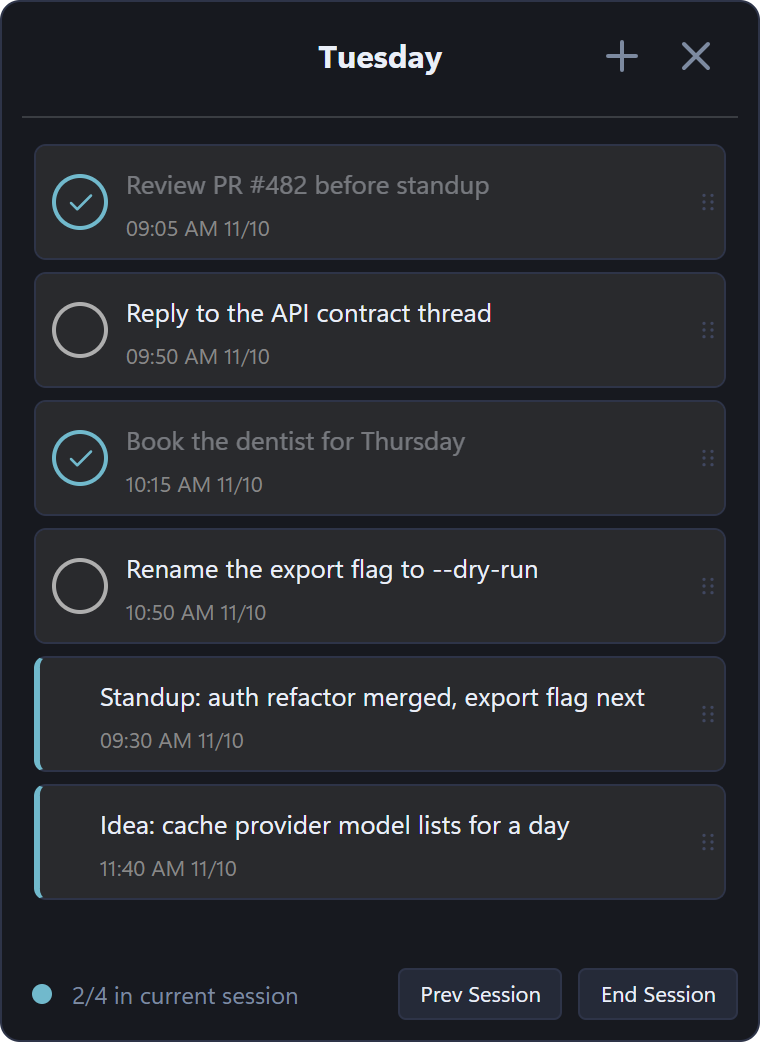
Command Palette doesn't take notes. Tendor's notes and tasks are plain Markdown files in a folder on your PC, a Vault, that any editor can open and nothing syncs. The free plan keeps 10 notes and 15 tasks per session and two Vaults; Monthly lifts the limits.
Extensions and Skills
Command Palette takes community extensions from a gallery in its settings, reviewed before they're listed and installed through WinGet. Extensions add new commands to the palette.
Tendor's Skills are instructions for the AI: a named set of steps you write once and run by typing / and its name, like /standup to turn the day's notes into a stand-up update. Free keeps five, Monthly is unlimited.
Price and open source
PowerToys, Command Palette included, is free and open source under the MIT license, and runs on Windows 11 or Windows 10 version 2004 or newer.
Tendor isn't open source. It's free with daily limits, or $4.99 a month for Monthly, and runs on Windows 11. With your own key, your AI provider bills you for what you use. See pricing.
Which to choose
Choose PowerToys Command Palette if
- You want to find and open apps, files, folders and settings from the keyboard
- You want a launcher that is free and open source, made by Microsoft
- You want to switch windows, run commands, search the web and do sums from one box
- You are on Windows 10
Choose Tendor if
- You want to ask AI from any app, on your own key, with the provider you pick
- You want to write a note the moment it comes, kept as a Markdown file on your PC
- You want your screen sent with a question in one step
- You want the AI to follow instructions you wrote yourself, as Skills
Questions
What is the PowerToys Command Palette shortcut?
Win+Alt+Space by default. You can change it in Command Palette's settings.
Is PowerToys Run going away?
Microsoft calls Command Palette PowerToys Run's evolution and says Run is getting an upgrade to v2. For now Run still opens with Alt+Space and is listed among the PowerToys utilities.
Does PowerToys Command Palette have AI?
Microsoft's Command Palette pages don't mention AI. PowerToys' Advanced Paste, on Win+Shift+V, can paste with AI once you turn it on, using an online provider with your own API key or a local model.
Can I use Tendor and Command Palette together?
Yes. They do different jobs and their shortcuts don't clash: Win+Alt+Space opens Command Palette, Ctrl+, opens Tendor.
Is Tendor free?
Yes, with daily limits: 20 AI questions a day, and 10 notes and 15 tasks per session. Monthly, at $4.99, lifts them.
Sources
- Command Palette: its Win+Alt+Space shortcut, what it does and its Extension Gallery (learn.microsoft.com, checked )
- Command Palette's extensions come from a curated gallery and install through WinGet (learn.microsoft.com, checked )
- PowerToys Run opens with Alt+Space, and Command Palette is its evolution (learn.microsoft.com, checked )
- Advanced Paste: Win+Shift+V, AI paste off by default, and its online and local providers (learn.microsoft.com, checked )
- PowerToys is a set of free, open-source utilities (learn.microsoft.com, checked )
- PowerToys runs on Windows 11, or Windows 10 version 2004 or newer (learn.microsoft.com, checked )
- PowerToys is under the MIT license (github.com, checked )
Tendor puts a note or an AI question one hotkey away, in any Windows 11 app. Free to start.
Read next
Tendor vs Raycast: a Raycast alternative for Windows
Looking for a Raycast alternative for Windows? Raycast now runs on Windows. Here is how it compares with Tendor on AI, price, notes and your own API key.
ChatGPT keyboard shortcut on Windows vs Tendor
The ChatGPT keyboard shortcut on Windows is Alt+Space. Here is how it compares with Tendor's hotkey for any AI on your own key, and with Claude and Gemini.